Bulk translation of 3,000 hiking route records into Russian via n8n + OpenAI (with staged quality checks)
The client needed a large dataset translated into Russian: about 3,000 rows with route names and descriptions in various European languages (mostly EN/DE/FR, but without a strict guarantee that those were the only languages present).
A regular chat interface is not a practical tool for this kind of task: the volume is too large, the process must be batch-based, the file structure has to be preserved, and the output needs to be consistent across the whole dataset. The client also explicitly ruled out Google Translate because the task required more careful translation for travel-route descriptions.
What mattered for the business
- Translate the full dataset (3,000 rows) without manual copy/paste in chunks.
- Preserve the Excel file structure, including hidden columns.
- Run an intermediate quality check before processing everything.
- Deliver the result in a format the client could import immediately.
- Minimize manual cleanup after the automated translation run.
To reduce risk, the work was run in stages: first a test batch, then a 500-row file for intermediate review, and only after quality confirmation a full run.
If you have a similar task (bulk translation of a catalog, descriptions, listings, routes, or import-ready content), send the file and requirements via the brief form. I can build a batch workflow and a quality-check process for your volume.
What was done in n8n
I built an n8n workflow that processes table rows in batches, sends route names and descriptions to OpenAI for translation, receives a strictly structured response, and writes the translated fields back into an output file.
- Built a batch-processing flow for Excel data instead of manual chat-based work.
- Ran a small test batch to verify translation quality.
- After alignment on quality, ran an intermediate 500-row batch with manual spot checks.
- After client confirmation, ran the full dataset.
- Kept Excel (
.xlsx) as the delivery format, which fit the client's import workflow. - Accounted for the requirement to preserve the table structure (including hidden columns).
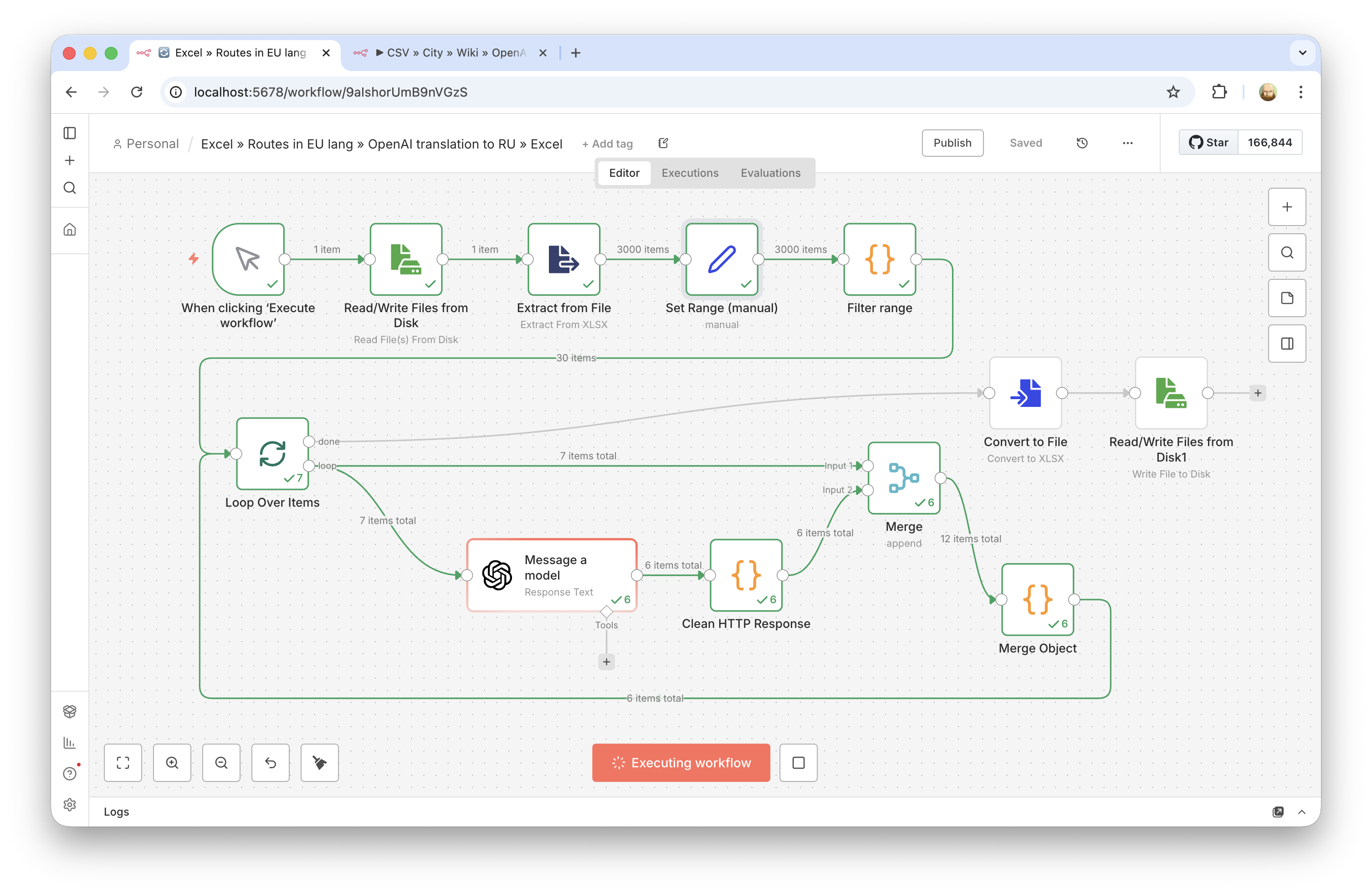
Technical details: how the processing pipeline was organized
Technically, this was not just a "translate some text" task. It required a stable pipeline for a large file so the data structure would not be damaged and the output would stay manageable across 3,000 rows.
- Batch processing instead of one massive request. The table was split into individual records, and each row went through the same translation scenario. This avoids the volume limits of a regular chat and makes row-level error control possible.
- Structured model response. For each row, the model returned JSON with two fields (translated name and description), so the result could be mapped back into the table reliably without manual cleanup.
- Intermediate quality checks. Instead of running everything at once, the process used checkpoints: first dozens of rows, then 500. This greatly reduces the risk of a prompt/format issue propagating across the whole dataset.
- Preserving the original file structure. A key requirement was not to break the original Excel file and not to lose hidden columns, so the result was delivered in the same format (
.xlsx) instead of a flattened CSV/Google Sheets export. - Description formatting. By agreement with the client, descriptions were kept without HTML tags, using readable line breaks/paragraphs to match the existing data format.
Technical details: key prompt lesson (simpler worked better)
An especially useful takeaway from this project: the first version used a detailed prompt with many constraints and clarifications (text type, style, formatting, list behavior, wording for route names, etc.). On paper, it looked more "correct", but in practice it turned out to be over-engineered.
After the client's feedback, the prompt was simplified. The result improved: the translation became closer to the client's expectations and to the sample style they had already approved. This is a practical lesson for LLM automations: a long and highly detailed prompt does not always produce better output, especially when the goal is neutral bulk translation rather than heavy stylistic control.
- The complex prompt introduced more unnecessary interpretation.
- The simpler prompt matched the expected tone and format better.
- The decision was made from fast test runs on real rows, not from theory.
In practice, this means it is worth planning a short prompt A/B check on real data before launching a full-scale n8n + LLM batch run.
Result
- The full dataset of about 3,000 rows (route names + descriptions) was translated.
- The work was delivered in stages with intermediate quality confirmation (test -> 500 rows -> full run).
- The file was delivered in Excel format, ready for the client's import process.
- The client accepted the result and confirmed translation quality.
This format works well for tasks where you do not need a one-off AI answer, but a controlled bulk run over a table with quality checks and clean delivery in a working file format.