Complex Sales Calculator: Moving from Excel to a Web App
October 4, 2014 · Services: Calculators · Data
This is an archival but still useful example from practice: the project was built on October 4, 2014 (as of February 2026, that is 11+ years ago). Today I would typically use more modern and more expressive web frameworks for this kind of task, but the project still shows well why businesses move from Excel to a web application.
1. The Project from a Business Perspective
The calculator was built to automate sales estimates for stretch ceilings. The pricing logic was complicated: many parameters, dependencies, and discount rules affecting both intermediate and final totals.
Before the calculator, preparing an estimate for one client could take up to 30 minutes, which led to typical problems:
- slow sales work and lost momentum during client conversations,
- manual calculation errors affecting margin and customer trust,
- difficult onboarding for new sales staff due to many exceptions and rules.
Initially, the client considered implementing this in Excel. That is a common first idea, but for this workflow it quickly runs into limitations.
2. Why a Web App Instead of Excel
A web version of the calculator was proposed instead of Excel. The key idea was to move business logic into a single interface that works the same way for the whole team.
Practical advantages of a web app over Excel in this project:
- no dependency on specific Excel versions or local setup on each computer,
- one calculation logic for all employees instead of diverging spreadsheets,
- instant recalculation when parameters change,
- centralized updates of pricing and discount rules,
- easier storage and reuse of estimate variants,
- lower onboarding friction thanks to UI hints.
All calculations were implemented in frontend JavaScript, which provided immediate feedback in the UI without waiting for server responses and made future rule changes simpler.
3. Final Result
The interface was built with Bootstrap (a pragmatic choice at the time to reach a working tool quickly). In this publication the demo is preserved as is on an old Bootstrap stack, without refactoring, so clients can click through the logic and behavior.
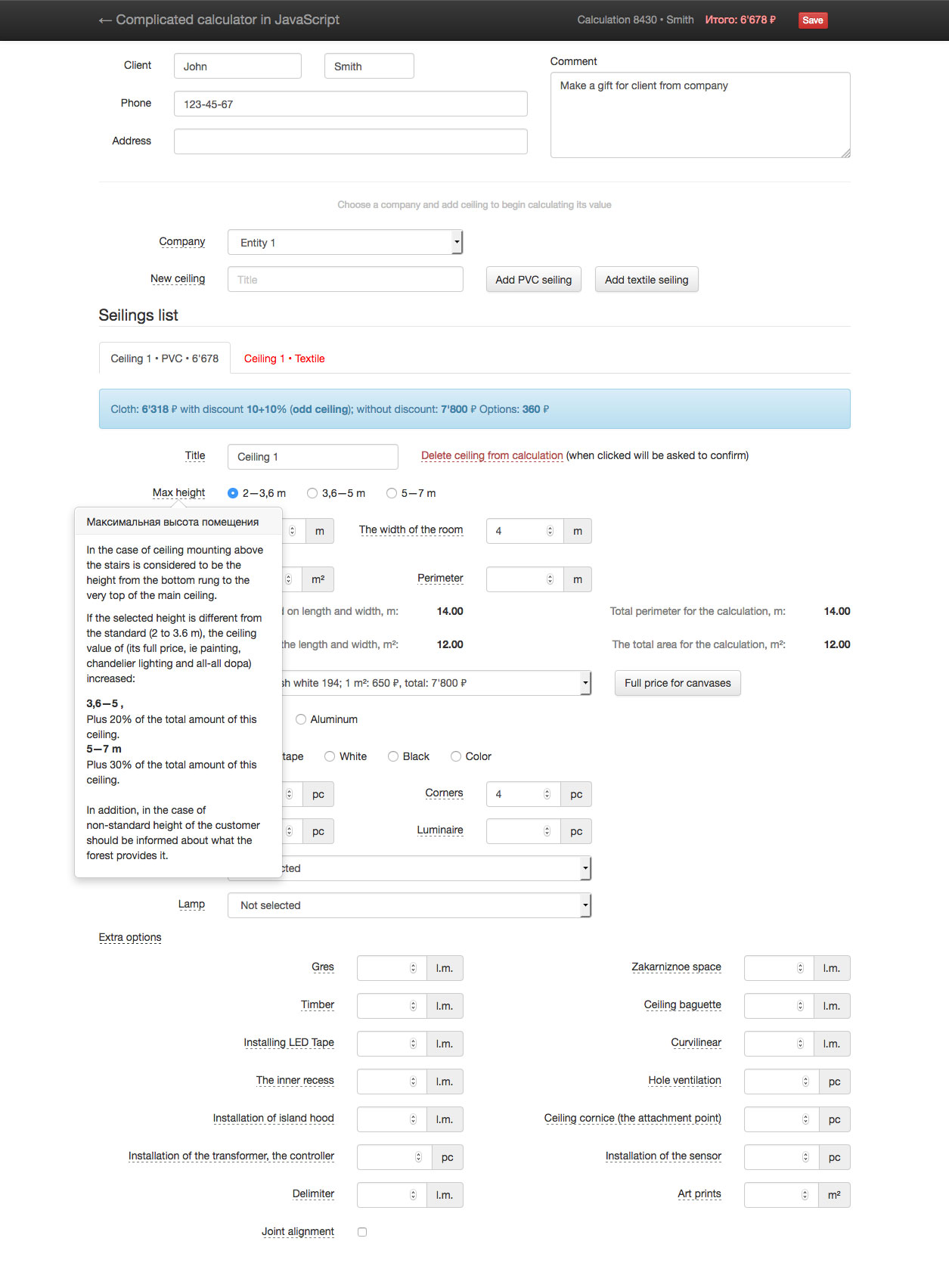
Interactive demo version of the stretch ceiling calculator
After rollout, a sales agent only needed to enter parameters and the estimate updated immediately. The agent no longer had to memorize all exceptions, because the interface included contextual hints and notes.
4. What the Calculator Handled
- multiple ceilings in a single estimate (for example kitchen, living room, bathroom),
- different ceiling types (PVC and fabric) with shared and type-specific logic,
- discount rules and interdependent parameters,
- stateful estimate data with recalculation on change,
- export of the final estimate to Excel.
Implementation-wise, there was a shared “ceiling” entity for common calculations plus specialized descendants for type-specific behavior.
5. Why This Example Is Still Useful
Although the implementation is historical (2014), the scenario is still current: when sales relies on a complex formula with exceptions and discounts, moving from Excel/manual calculations to a web tool usually gives a fast payoff in speed, quality, and team onboarding.
Today I would usually choose a modern framework (depending on context: React, Vue, Svelte, etc.) and a more modern UI architecture. But as a demonstration of practical business impact, this example is still representative.