Migrating a legacy Perl application from an old server to UpCloud
May 30, 2026 · Services: Legacy Perl · Perl hosting · Data
In this project, an old Perl web application had to be moved from a physical server to a more modern cloud infrastructure. The task was not to rewrite the application from scratch, but to move a working system carefully, split the data into clearer infrastructure layers, and reduce operational risk.
The original setup was typical production infrastructure from the 2000s: one server, Apache, a Perl application, MySQL on the same machine, and several gigabytes of images on the local disk. The application codebase was not large, but the system depended on old assumptions: local paths, Apache rules, file structure, and the behavior of an old MySQL schema.
UpCloud was chosen for the target infrastructure: the application could run on a separate compute instance, the database could move to managed MySQL, and images could be placed in object storage with an S3-compatible API. This required more careful migration work than moving everything "as is" to a single VPS, but it gave a cleaner maintenance model after launch.
Task
The goal was to move the legacy application to new infrastructure without losing data and without unnecessary changes to the old business logic. This required:
- understanding the old Apache, Perl, MySQL, and image-file setup;
- preparing the target environment on UpCloud;
- migrating a MySQL database of about 5 GB;
- preparing several gigabytes of images for object storage;
- preserving old URLs and file-serving rules;
- agreeing on the data freeze point before the final cutover;
- keeping the old server as a fallback during the post-go-live period.
Why This Was Not Just File Copying
Legacy applications often look small in terms of code but are complex in terms of runtime environment. In projects like this, the main work does not start with writing new features. It starts with recovering hidden dependencies: where files are stored, which Apache rules serve images, how the application connects to the database, which paths are configured, and which old database assumptions were treated as normal for years.
The old server used an "everything in one place" model: application, database, web server, and images all lived on the same machine. This can be convenient at the beginning, but it becomes a risk over time: updates, backups, recovery, security, and diagnostics all depend on one node.
The target architecture split responsibilities:
- compute: runtime for the Perl application and web server;
- managed MySQL: a separate managed layer for the database;
- object storage: separate storage for images;
- old server: temporary fallback in case rollback was needed after cutover.
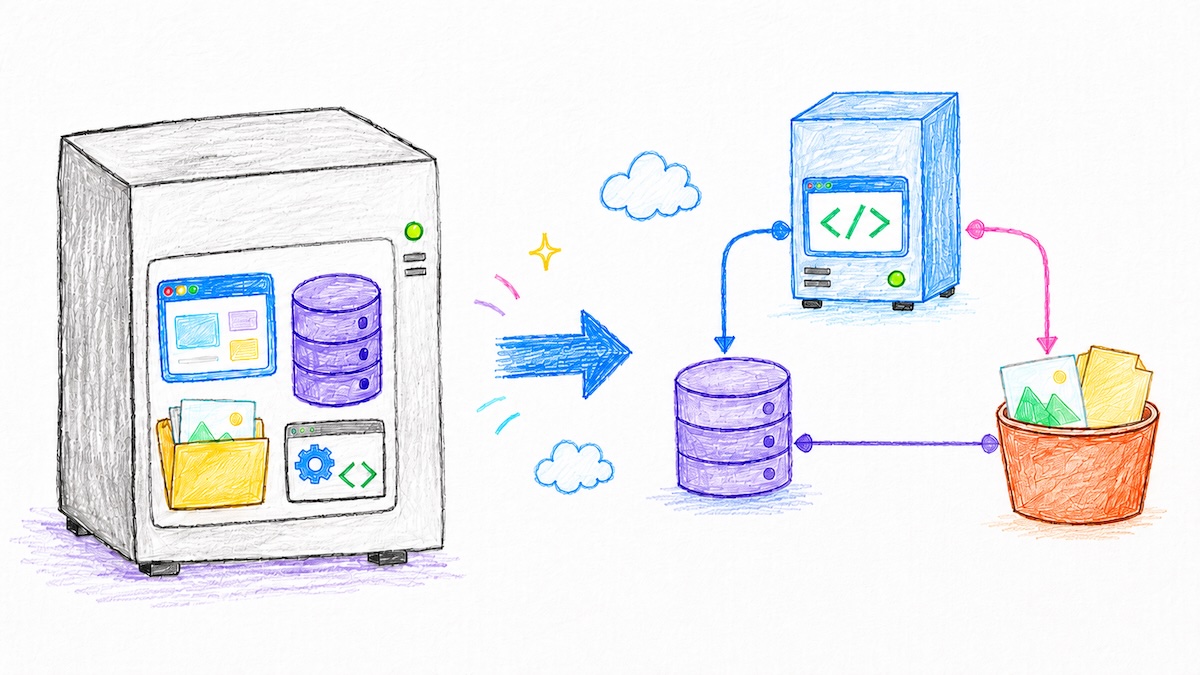
Figure 1. Legacy Perl migration: the application, database, and images are split between compute, managed MySQL, and object storage.
Migration Plan
For the client, it was important to describe the migration as a controlled process, not as a one-off server copy. The plan was built around clear stages:
- Prepare services on UpCloud.
- Create a full backup of the old system.
- Bring up the environment for the Perl application.
- Import the database into UpCloud Managed MySQL.
- Move images into object storage.
- Test the application, URLs, and file delivery.
- Run a final sync if needed.
- Agree on production traffic cutover.
- Monitor the system after launch.
- Keep the old server available as a fallback.
The freeze point was called out separately: after the backup is taken and transfer begins, new changes on the old server no longer move to the new system automatically. For this kind of migration, that is a critical operational detail. If it is not agreed upfront, the technical transfer may be correct while the data still diverges during cutover.
MySQL: Old Schema Problem
The most difficult part was not the Perl code. It was the mismatch between assumptions in the old database and managed MySQL. The legacy database had tables without primary keys. That worked on the old self-hosted MySQL server, but a managed MySQL service can be stricter because of replication, backup, and recovery requirements.
As a result, importing a dump directly does not always work. If the service requires primary keys, the old schema has to be adapted: add surrogate primary keys to problematic tables and carefully bring the dump in line with the new structure.
There is an important technical trap here. If a new primary-key column is added, old statements such as INSERT INTO table VALUES (...) can break because the number and order of columns no longer match the old dump. For those tables, inserts need to be rewritten with an explicit column list.
INSERT INTO old_table (old_column_1, old_column_2, old_column_3)
VALUES (...);
This is a small example of why migrating an old database into a managed service is not only about import speed. You need to check which technical assumptions the old MySQL setup tolerated for years, and which ones the new environment no longer accepts.
Images and Object Storage
Images were a separate part of the work. In the old system, they lived on the local disk and were served through Apache rules. Access rules on the old server could interfere with image delivery, so it was not enough to check that files existed. The whole path from URL to web-server response had to be tested.
In the new architecture, images were planned for UpCloud Object Storage. It is S3-compatible storage, so familiar tools such as AWS CLI can be used for upload, but with UpCloud endpoint and credentials configuration.
In practice, "S3-compatible" does not mean every client with default settings works perfectly with every storage backend. During upload, a XAmzContentSHA256Mismatch error appeared on PutObject. Issues like this have to be checked on real files because they depend on request signing, checksums, payload signing, and the behavior of the specific S3-compatible endpoint.
For the project, this meant the image migration could not be treated as a simple rsync. The bucket layout, mapping from old paths to new URLs, and file delivery after migration all had to be planned and tested separately.
Why UpCloud
In projects like this, there is always a temptation to move everything to one new VPS and reproduce the old architecture as closely as possible. That is faster and requires fewer changes, but it keeps the same operational model: self-managed MySQL, backups, updates, security, and recovery.
The UpCloud option was useful precisely because it gave a more manageable infrastructure: the application remains a small compute layer, the database moves to managed MySQL, and heavy files move to object storage. For an old but still useful application, this is often a reasonable compromise between "rewrite everything" and "leave it as it was".
Result
- The old single-server setup with Apache, Perl, MySQL, and local images was analyzed.
- A target migration architecture on UpCloud was prepared, separating the application, database, and file storage.
- A MySQL dump of about 5 GB was handled with attention to tables without primary keys.
- The dump adaptation approach was defined: surrogate primary keys and explicit column lists in insert statements.
- The image migration to S3-compatible object storage and related edge cases were analyzed.
- The client received a migration plan: backup, import, test, cutover, monitoring, and fallback.
- The freeze point was called out explicitly to avoid losing changes made on the old server after backup.
Who This Format Fits
- Projects on Perl, PHP, or another legacy stack that still work and provide value.
- Systems where everything historically lives on one server: application, database, files, and web server.
- Project owners who need migration without a full rewrite of business logic.
- Teams that want to move the database into a managed service and files into object storage.
- Projects where downtime, data synchronization, and fallback need to be planned upfront.
If you need a similar result: I help analyze old environments, prepare migration plans, move databases and files, verify applications after relocation, and avoid data loss during cutover.