Stabilizing email sync from an external API in n8n (eliminating hangs and overlapping runs)
The client (an online project with a Telegram bot and email-based access) already had an n8n automation that loaded emails from an external API, but it was unstable: exports stalled, new runs started before previous ones finished, and API errors often required manual restarts.
This was not only a technical issue but a business one: the bot needs fresh emails soon after a user is added, and other automations must not break while the email table is being updated.
What mattered for the business
- The email list had to refresh regularly without manual intervention.
- The bot had to see new users quickly.
- Temporary errors or external API rate limits should not stop the whole flow.
- List updates should not interfere with other workflows reading the same data.
- Removal of outdated emails should be predictable and separate, without a full destructive reload every time.
The result was a more resilient n8n process with protection against overlapping runs, waiting for export readiness on the external API side, rate-limit handling, and a safer data update strategy.
If you have a similar situation (bot, integration, data table, unstable API, periodic hangs), send the task via the brief form. I can review the flow and propose a working setup without manual babysitting.
What was done in n8n
First, I reviewed the existing workflows and dependencies: email loading, deletion logic, and separate checks/waits. Then I rebuilt this into a more coherent process that handles external API delays better and does not conflict with itself.
- Redesigned the email table update logic in n8n.
- Added protection against parallel runs (a new run does not start until the previous one completes).
- Added waiting for export readiness from the external API (with timeouts and repeated checks).
- Handled API limits: increased intervals and added retries.
- Merged loading and deletion logic into one resilient process instead of two separate workflows.
- Moved keys into n8n Credentials so they are not stored in workflow JSON exports.
- Added
Sticky Notesinside the workflow to document logic directly in n8n (important when multiple people work with the same flow and separate docs become outdated). - Prepared final JSON exports for transfer/backup and tested the flow.
Before and after the redesign
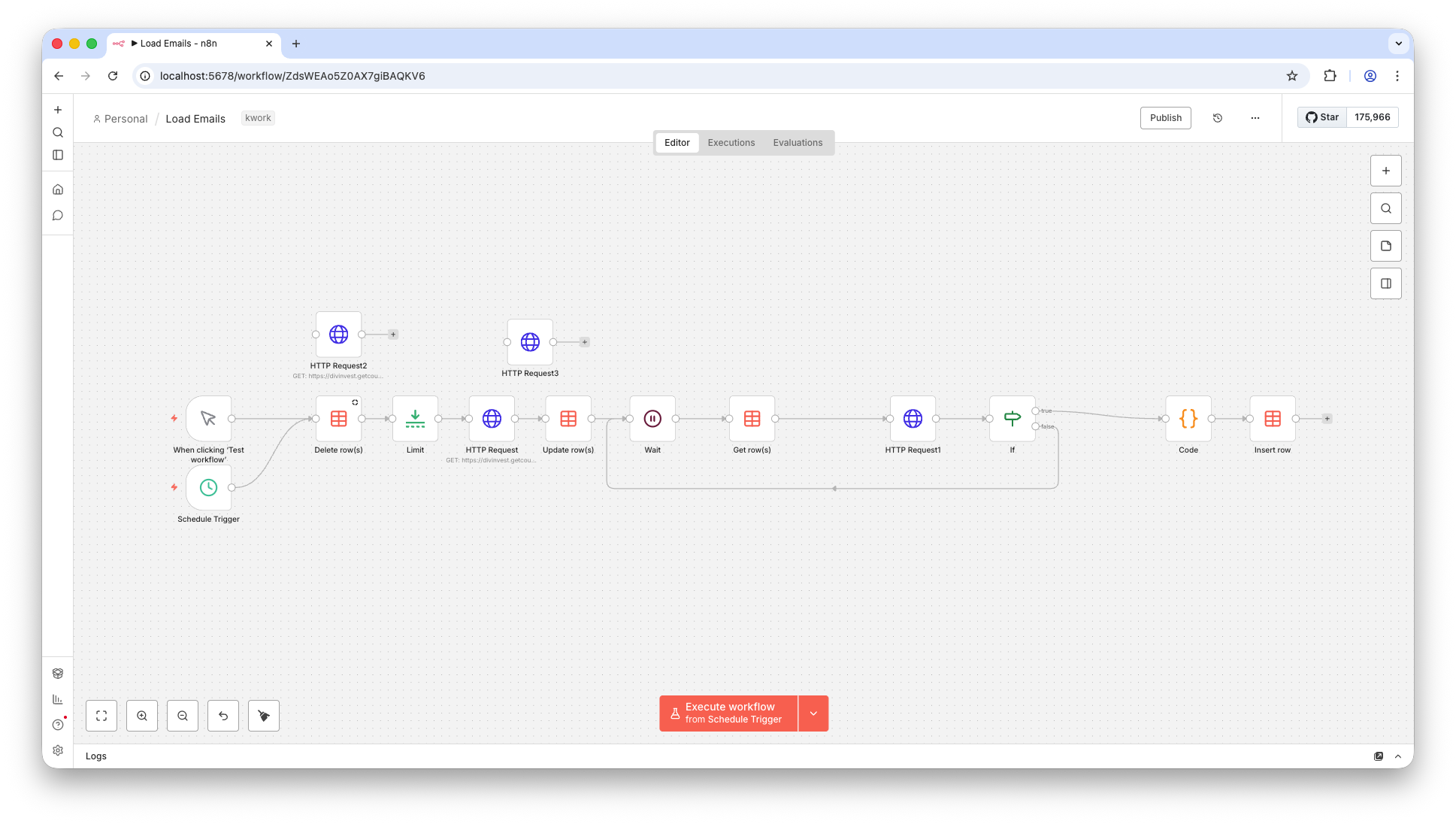
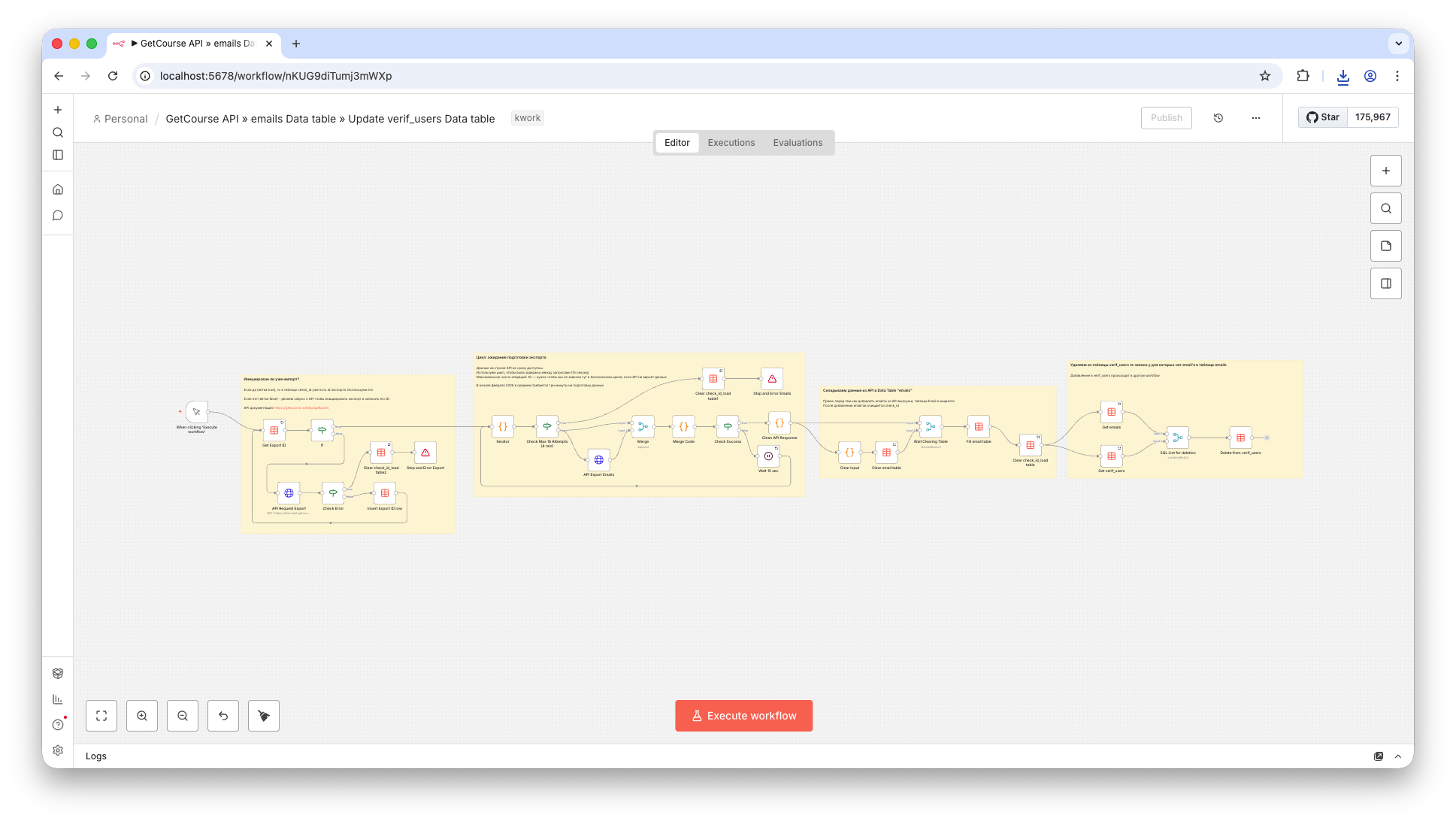
Below is the visual difference: from a shorter but less stable loading flow to a more controlled process with explicit waiting, checks, synchronization, and error handling.
Before. The original flow was shorter, but less resilient to API delays and overlapping runs:
After. A more detailed and resilient process with waits, checks, run synchronization, error handling, and embedded notes inside the workflow:
Zoomed workflow fragment
Below is an enlarged fragment so the step structure and connections are easier to read.
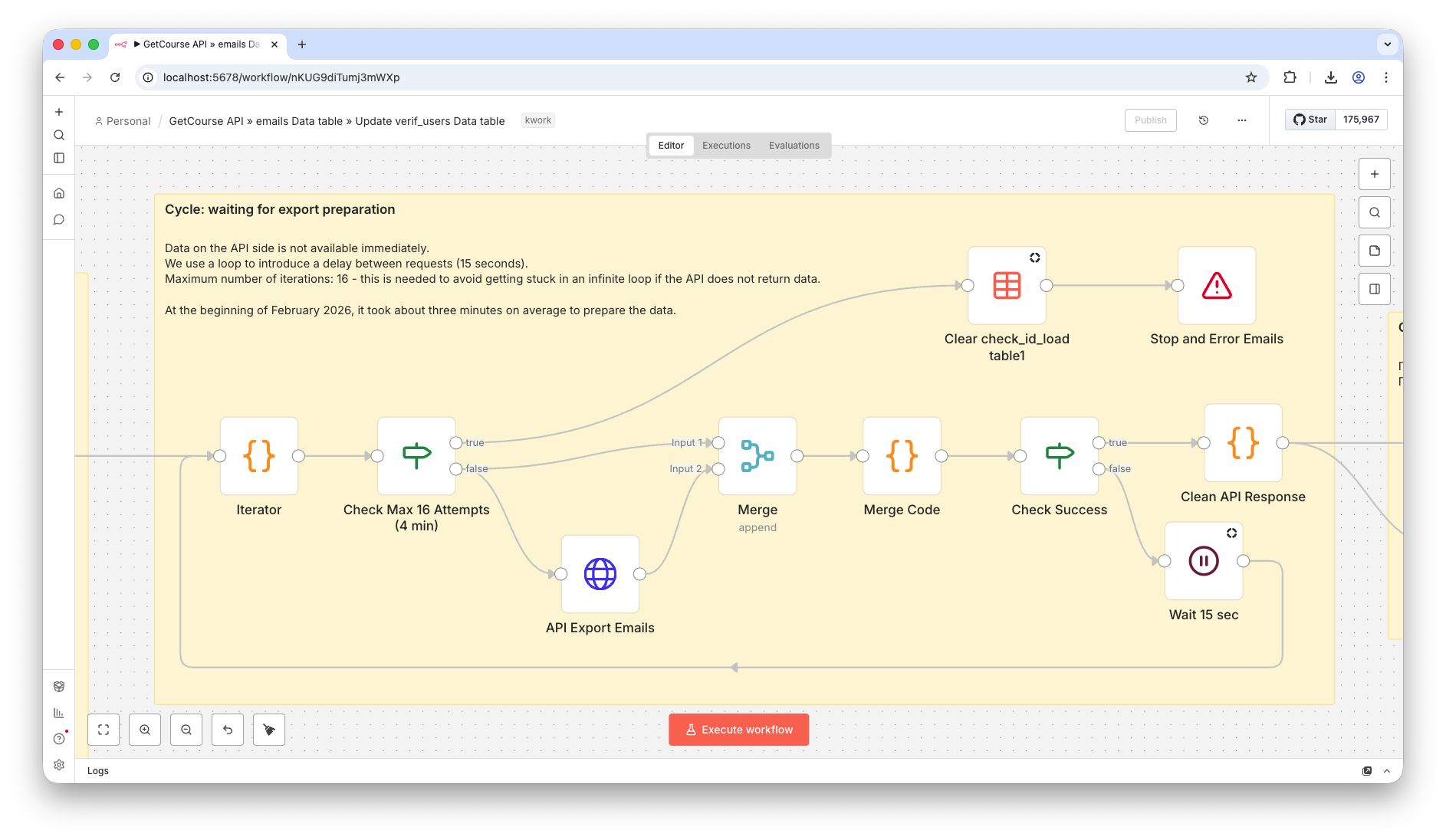
This fragment also shows how Sticky Notes help document the workflow directly inside n8n. That matters when different developers/operators maintain the same flow: separate documents are often lost or stop being updated, while notes inside the workflow tend to stay in sync with changes.
Technical description: what changed
- Reviewed the current scheme and failure points: where exports hang, where reruns can overlap, and where other processes may read inconsistent data.
- Reworked email table updates: instead of a blunt full rewrite, implemented a safer add/remove logic based on comparing current data with the API export.
- Added parallel-run protection: one run cannot update the same table while another run is still active.
- Added export readiness waiting: the external API may need several minutes to prepare an export, so the workflow now uses pauses and repeated status checks.
- Handled rate limits and temporary API errors: the process retries instead of failing immediately.
- Merged load and deletion logic into one process to remove duplication and reduce desynchronization between workflows.
- Moved sensitive values into n8n Credentials instead of storing them in plain workflow JSON.
Technical details: Data Tables in the client project
The client project already used n8n Data Tables (an email table plus service tables for workflow state). This is a valid option for this kind of task, especially when you need a fast result inside n8n without introducing a separate database immediately.
Pros of Data Tables in this setup
- Fast start: no need to deploy a separate database first.
- Convenient for internal n8n automations: data lives next to the workflows.
- Useful as a technical state store (for example, a flag or current export ID).
- Good fit for small and medium volumes where delivery speed matters more than architecture complexity.
Cons and constraints to keep in mind
- With full delete-and-reload, there is a window where other workflows may read an empty or partial table.
- You need explicit parallel-run control, otherwise update conflicts are easy to introduce.
- With an unstable API and frequent updates, logic complexity grows quickly (waits, retries, status checks).
- For higher loads and more complex relations, it is often better to move to a separate DB with explicit transactions and locking (for example, Postgres/Supabase).
In this project it was more rational to stabilize the existing Data Tables setup inside n8n than to immediately move everything to a separate database. If the next step requires stronger reliability and data control, the storage layer can be moved to Supabase/Postgres; I also take on that type of work: Supabase service.
Result
- Email sync became more stable, without regular manual restarts.
- Conflicting parallel runs were eliminated.
- The email table became safer for other workflows that read it.
- External API errors and limits no longer break the whole process.
- The bot keeps working even during temporary API-side issues.